
Touches
Touches Section (CRM Module)
The Touches section is a core component of the CRM module, used to log, view, and manage all patient interactions across various channels - calls, forms, requests, and consultations. It enables clinics to track communication history, follow up on leads, and manage responses with full visibility and accountability.
Each entry (called a “Touch”) represents a recorded interaction with a patient or lead, and can include call logs, requests, messages, offers, and referral orders.
Creating a New Touch
To learn how to create a new Touch, please refer to the New Touch page in the Knowledge Base.
Touch Viewing & Management
Navigation:
Main Menu > Touches
The interface contains five main tabs, each dedicated to a specific interaction type. Also, here you can find the +Create touch button, which opens the New touch section.
1. Touches Tab
This is the central log of all recorded interactions in the system.
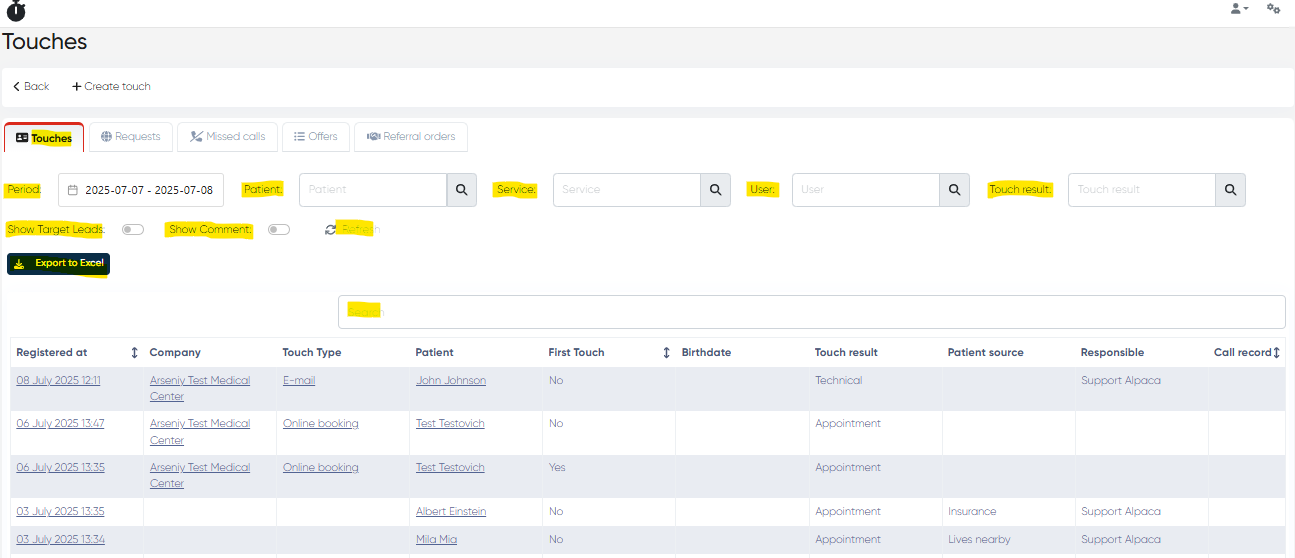
Columns:
Registered At – Date and time of the touch
Company – Associated clinic branch (if multi-site)
Touch Type – E.g., Call, Visit, WhatsApp, Form
Patient – Linked patient or lead
First Touch – Indicates whether this is the first contact
Birthdate – Patient’s date of birth
Touch Result – Outcome of the interaction
Patient Source – Origin (e.g., Website, Facebook, Walk-in)
Responsible – Assigned staff member
Call Record – Playback button if a recording is attached
Filters and Actions:
Period Selector (Calendar)
Patient Filter
Service Filter
User Filter
Touch Result Filter
Show Target Leads – Toggle to display leads only
Show Comment – Toggle to display comments directly in the table
Refresh / Reset Buttons
Export to Excel – Download the full list in spreadsheet format
Table search bar
2. Requests Tab
Displays inquiries submitted via website forms, integrations, or marketing channels.
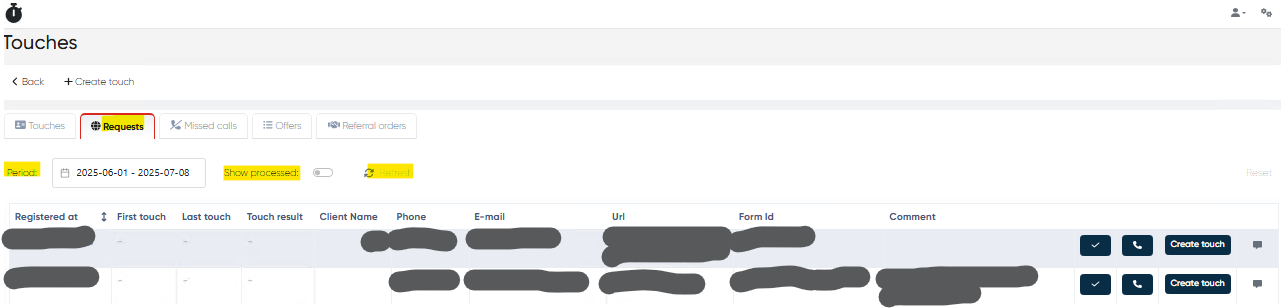
Columns:
Registered At
First Touch / Last Touch
Touch Result
Client Name, Phone, E-mail
URL – Source of request (e.g., landing page)
Form ID
Comment
Action Buttons:
Mark as Done
Call
Create Touch
Send Message (e.g., pre-filled WhatsApp templates)
Filters and Actions:
Period Selector
Show Processed – Toggle to show/hide completed requests
Refresh / Reset
3. Missed Calls Tab
Lists all unanswered or missed phone calls, helping staff quickly follow up.
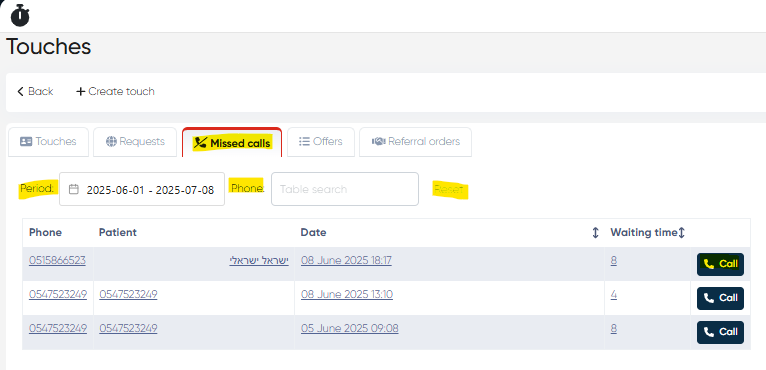
Columns:
Phone
Patient
Date
Waiting Time
Call Button
Filters and Actions:
Period Selector
Phone Search Bar
Reset Button
4. Offers Tab (Price Offers)
Displays service offers made to patients (e.g., treatment quotes or consultation packages).
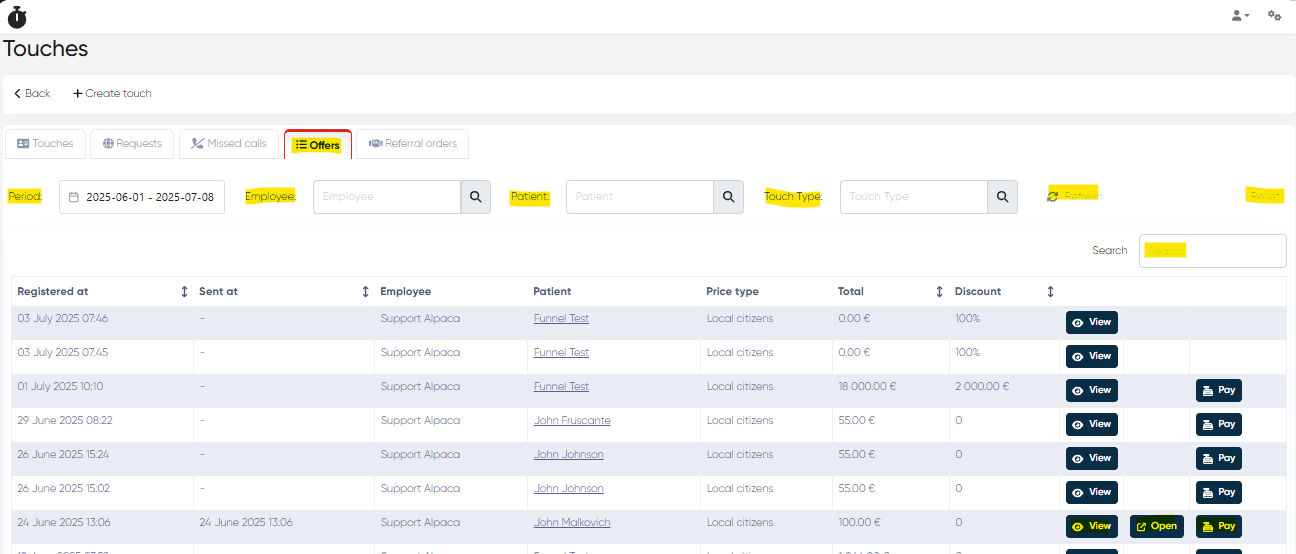
Columns:
Registered At
Sent At
Employee – Who created the offer
Patient
Price Type
Total Price
Discount %
Action Buttons: View, Open, Pay
Filters and Actions:
Period Selector
Employee / Patient Filters
Touch Type Filter
Refresh / Reset
Table Search Bar
5. Referral Orders Tab
Tracks referrals made by or to external partners (e.g., referrers, insurers, external labs).
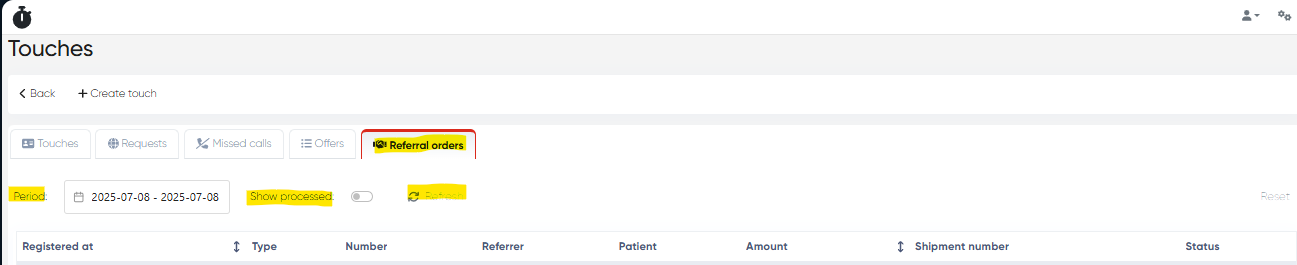
Columns:
Registered At
Type – E.g., Consultation, Imaging, External Lab
Number – Referral number
Referrer – Doctor or organization
Patient
Amount
Shipment Number (if applicable)
Status – E.g., Sent, Accepted, Completed
Filters and Actions:
Period Selector
Show Processed Toggle
Refresh / Reset
Summary of Features
Function | Description |
|---|---|
Central Touch Log | Unified view of all interactions (calls, forms, offers, etc.) |
Real-Time Filtering | Quickly drill into any data using advanced filters |
CRM Integration | Link interactions to leads, patients, services, and users |
Missed Call Recovery | Never lose a lead—track and return missed calls |
Offer and Referral Management | Handle commercial proposals and third-party orders |
Excel Export | Enable data export for offline tracking or reporting |