
Salary
Salary – EHR Module
The Salary section of the EHR module is designed for full-cycle management and tracking of doctor bonuses based on the services they provide. It allows you to define payment logic, monitor bonuses per doctor, and generate comprehensive reports across the clinic.
1. Setting Doctor Bonuses for Provided/Paid Services
Navigation:
Directories > Employees > Choose Employee > Payments to Doctors Tab
This tab allows clinic administrators to configure how and when doctors are compensated for specific services.
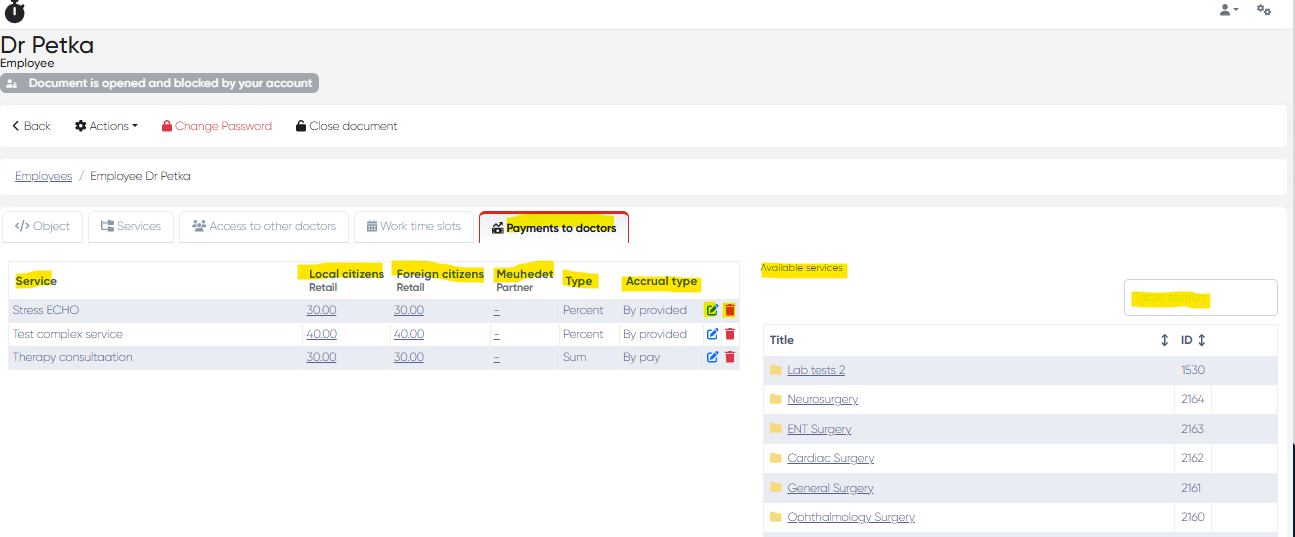
Service Bonus Table
Displays a list of services linked to the selected doctor, along with the configured bonus parameters.
Columns:
Service – Title of the service
Local Citizens Bonus – Fixed sum or percentage
Foreign Citizens Bonus – Fixed sum or percentage
Meuhedet Partner Bonus – Fixed sum or percentage
Type – Indicates if the bonus is a Sum or a Percent
Accrual Type – Determines if bonus is calculated By Pay (after payment) or By Provided (upon service delivery)
Actions:
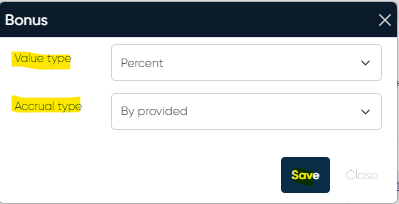
Edit – Opens the Bonus Review Window where you can:
Choose Value Type: Sum or Percent
Choose Accrual Type: By Pay or By Provided
Delete – Removes the bonus rule for the specific service
Add New Services
Available Services Table:
Displays all services not yet linked to a bonus rule
Includes Title and Service ID
Search Bar – Quickly find services
Click to Add – Add a service directly to the Bonus Table
2. Salary Tab in the Doctor's Cabinet (Bonus Report View)
Navigation:
Directories > Employees > Choose Employee > Actions > Open Doctor's Cabinet > Salary Tab
To make this tab visible in the Doctor’s Cabinet, enable it via:
Directories > Employees > Choose Employee > Actions > Edit > Show Salary in Cabinet > Set to Yes
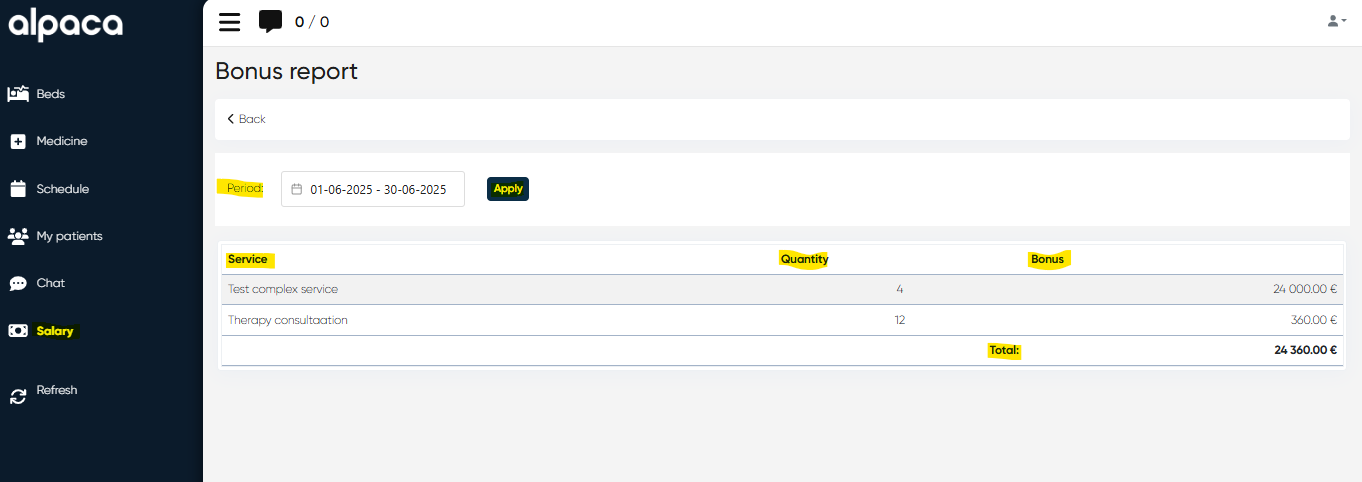
Bonus Report Table
Doctors can track their accumulated bonuses over a selected period.
Interface Includes:
Period Selection Bar – Choose a date range using the calendar, then click Apply
Bonus Table:
Columns: Service, Quantity, Bonus (in money)
Total Bonus: Displayed below the table for the selected period
This feature promotes transparency and allows doctors to monitor their personal earnings from service delivery.
3. Bonus Report for All Employees
Navigation:
Analytics > Payments to Doctors Report
Provides administrators with a flexible reporting tool for reviewing and exporting bonus data clinic-wide.
Key Functionalities:
Period Selector – Choose the reporting range using a calendar
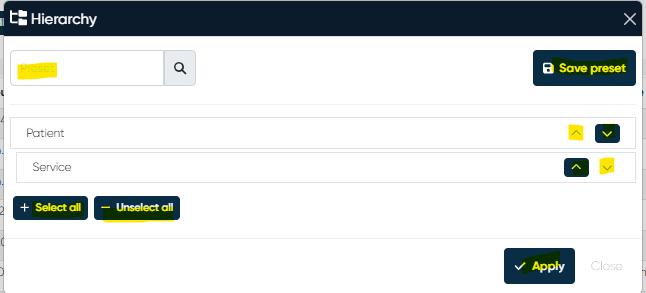
Hierarchy Button – Customize report layout
Move and arrange components such as Patient, Service, etc.
Save and load Presets
Select/Unselect all components
Apply and Close options
Employee Filter:
Employee On/Off Toggle – Toggle between general report and per-employee data
+ Add Employee – Manually include specific employees in the report
Action Buttons:
Apply – Refresh the report with selected parameters
Export to Excel – Download the report for offline processing
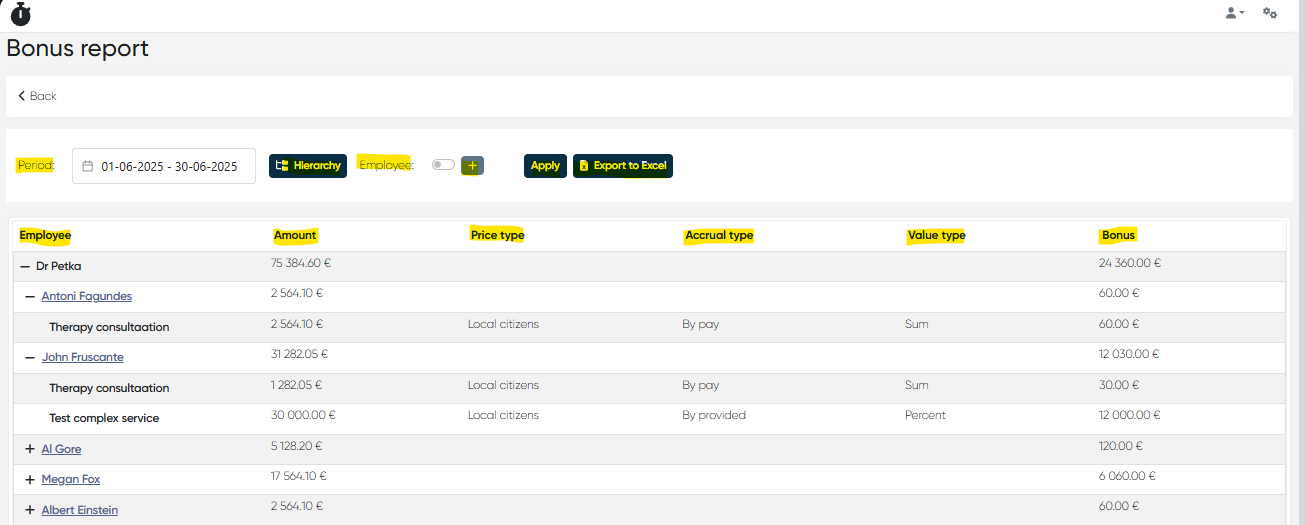
Report Table
Columns:
Employee – Grouped per chosen hierarchy (e.g., Employee > Patient > Service)
Amount – Revenue from services
Price Type – Pricing category used
Accrual Type – By Pay or By Provided
Value Type – Sum or Percent
Bonus in Money – Calculated bonus for the period
Use Case Summary
Set unique bonus rules per doctor and service type
Control payment logic: reward by service provision or upon payment
Give doctors access to transparent bonus tracking
Generate and export clinic-wide compensation reports