
PGD/NIPT
PGD/NIPT – EHR Module
The PGD/NIPT section in the EHR module provides a centralized workspace for managing genetic testing orders, specifically, Preimplantation Genetic Diagnosis (PGD) and Non-Invasive Prenatal Testing (NIPT). This section enables clinic staff to track, update, and manage both internal and partner-originated orders, ensuring full traceability of each stage of the genetic testing workflow.
1. General Access
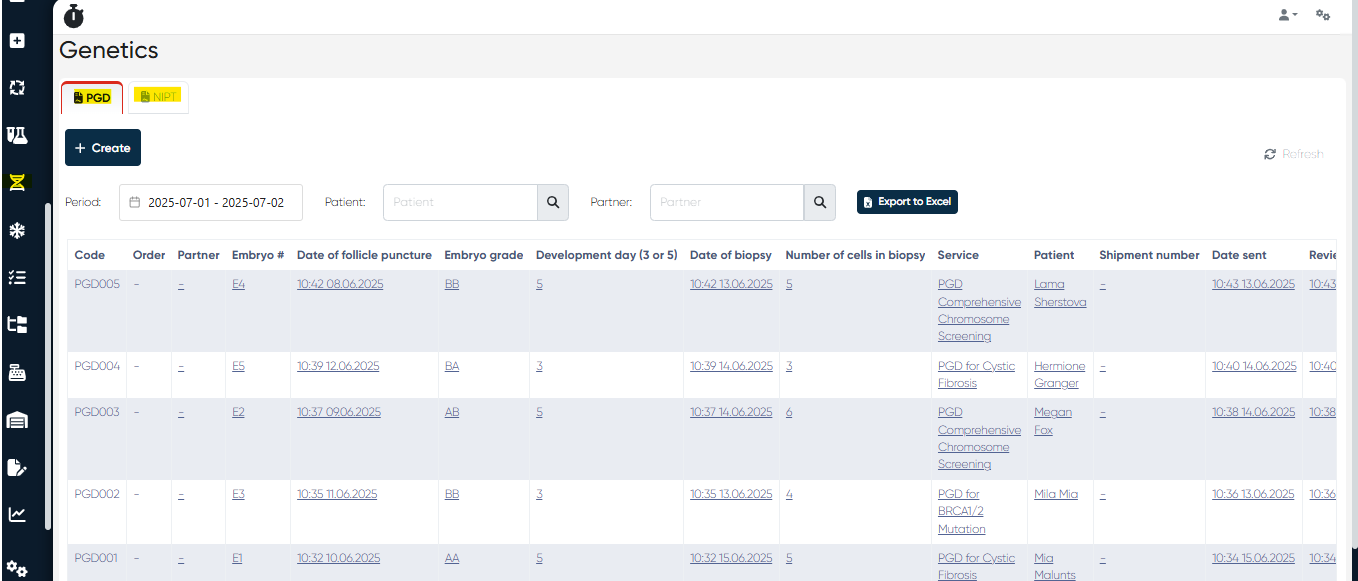
All PGD and NIPT orders—regardless of whether they are created internally or received from partner systems—are accessible via the Genetics section in the main menu of the system interface.
Note:
To understand how to create and proceed PGD/NIPT orders via partner systems, please refer to the relevant articles in the knowledge base:
Partner’s App section
Partner’s Web Cabinet section
2. PGD Orders Management
🔹 Navigation:
Main Menu > Genetics > PGD Tab
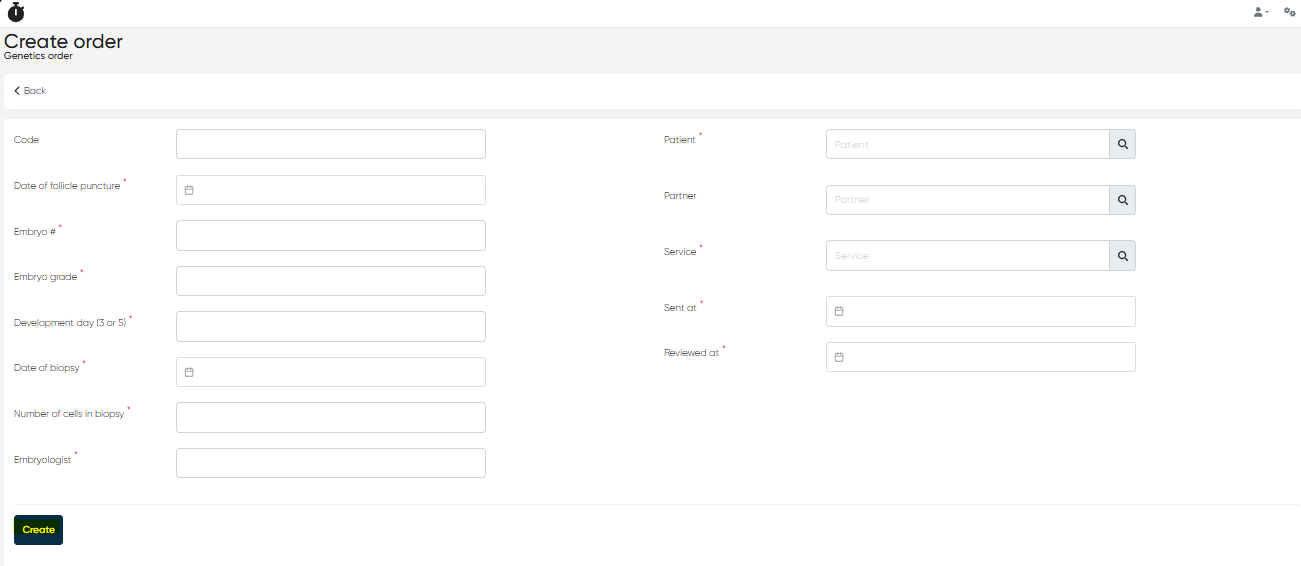
🔹 +Create Button
Clicking the +Create button opens the Create Genetic Order form, where you are required to enter the following parameters:
Code (optional): Internal order identifier, for quick internal reference or tracking.
Date of Follicle Puncture (mandatory): Date when oocytes were retrieved for fertilization.
Embryo # (mandatory): Unique identifier of the embryo that is to undergo genetic testing.
Embryo Grade (mandatory): Qualitative evaluation of embryo morphology.
Development Day (mandatory): Development stage of the embryo at biopsy (either Day 3 or Day 5).
Date of Biopsy (mandatory): The day the embryonic biopsy was performed.
Number of Cells in Biopsy (mandatory): Total cells extracted from the embryo for genetic evaluation.
Embryologist (mandatory): Staff member responsible for biopsy, selected from system users.
Patient (mandatory): Patient undergoing the PGD process.
Partner (optional): Partner clinic/laboratory involved in processing the order.
Service (mandatory): Type of PGD-related service from the clinic’s service list.
Sent At (mandatory): Date when the biopsy sample was shipped to the lab.
Reviewed At (mandatory): Date of internal review of the order or documents.
Once saved, the record appears in the PGD table.
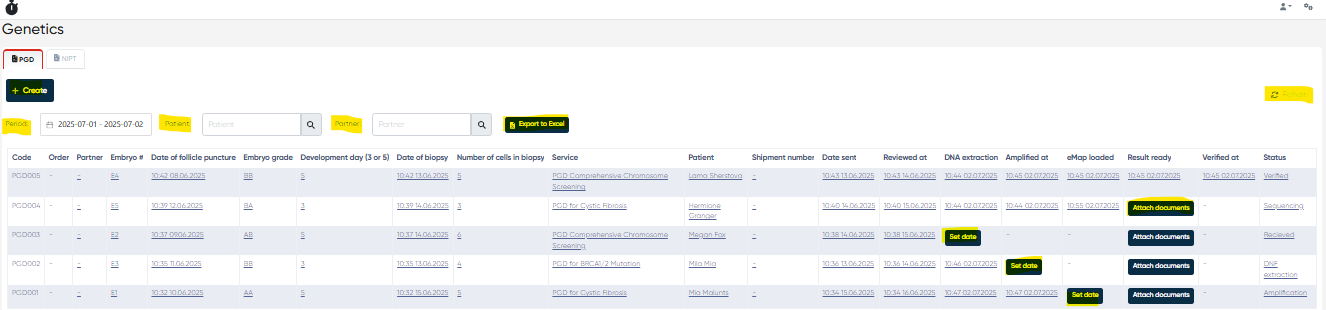
PGD Orders Table
A comprehensive view of all PGD orders, editable and updated across various stages of the workflow.
Table Columns Description:
Code: Internal code assigned to the PGD order.
Order: Automatically generated order identifier.
Partner: Name of external lab/partner involved.
Embryo #: Embryo identifier from the original fertilization cycle.
Date of Follicle Puncture: Date the oocytes were retrieved.
Embryo Grade: Quality grade assigned to the embryo.
Development Day: Development stage (Day 3 or 5).
Date of Biopsy: The exact date of embryo biopsy.
Number of Cells in Biopsy: Number of cells removed for testing.
Service: Type of PGD test or service applied.
Patient: Patient's full name.
Shipment Number: Courier or logistics ID for tracking the sample shipment.
Date Sent: Date sample left the clinic.
Reviewed At: Date the clinic reviewed incoming or existing results.
DNA Extraction: Set or display the date when DNA was extracted.
Amplified At: Set/display date when DNA amplification was performed.
eMap Loaded: Set/display date for loading the genetic mapping.
Result Ready: Attach or show the result documents.
Verified At: Set/display the final verification date.
Status: Indicates stage of the PGD lifecycle:
Received: Sample accepted at the lab
DNA Extraction: The Sample is undergoing DNA isolation
Amplification: Amplification of extracted DNA
Sequencing: Genomic sequencing
Result Ready: Result document available
Verified: Result reviewed and finalized
Filters and Buttons:
Period: Filter by order creation date
Patient: Filter by specific patient
Partner: Filter orders associated with a specific lab/partner
Export to Excel: Download data in spreadsheet format
Refresh: Reload the updated order list
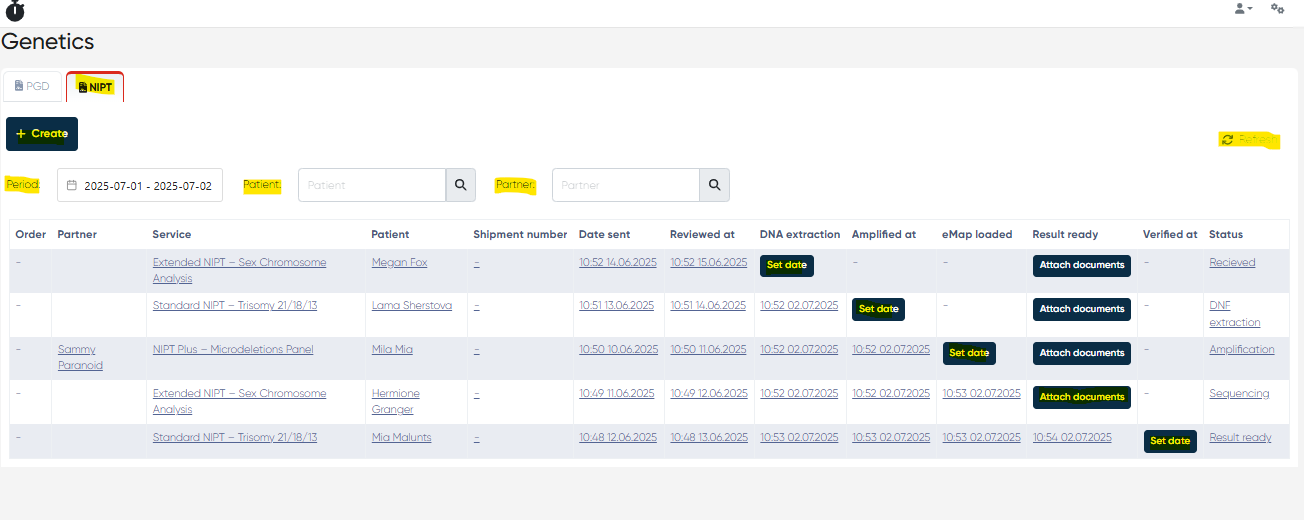
3. NIPT Orders Management
Navigation:
Main Menu > Genetics > NIPT Tab
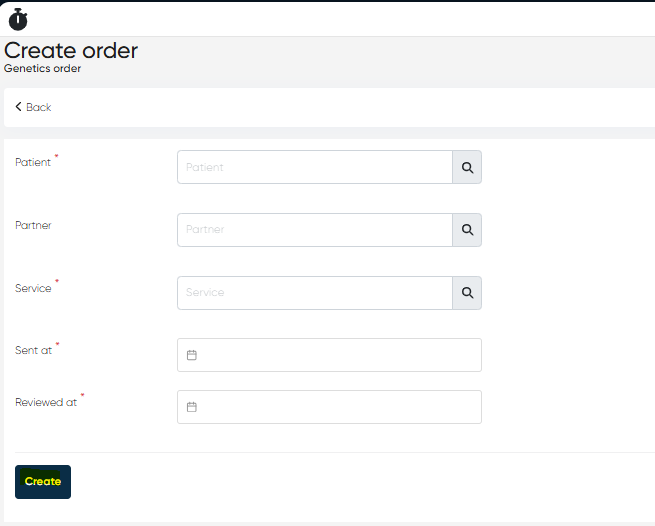
+Create Button
Opens a simpler Genetic Order form for non-invasive prenatal test orders:
Parameters:
Patient (mandatory): Patient undergoing prenatal test.
Partner (optional): External lab/clinic processing the order.
Service (mandatory): Specific NIPT service used.
Sent At (mandatory): Date when the test sample was shipped.
Reviewed At (mandatory): Internal document/review date.
NIPT Orders Table
Structured overview of all created and processed NIPT orders.
Table Columns Description:
Order: Order number (auto-generated).
Partner: Associated external lab/partner.
Service: The NIPT service is assigned.
Patient: Patient who underwent the NIPT.
Shipment Number: Delivery/tracking ID for the sample.
Date Sent: When the sample was shipped.
Reviewed At: Date document/results were reviewed.
DNA Extraction: Status/date for DNA isolation.
Amplified At: Date the amplification process was completed.
eMap Loaded: Date of uploading genetic mapping results.
Result Ready: Status/date of available results.
Verified At: When the results were officially confirmed.
Status: Real-time status of the test, same as PGD:
Received, DNA Extraction, Amplification, Sequencing, Result Ready, Verified
Filters and Buttons:
Period: Filter by date range
Patient: Filter by patient name
Partner: Filter by external partner name
Refresh: Reload the current data table
Summary
The Genetics Section of the EHR module streamlines and standardizes the workflow for genetic testing orders, including PGD and NIPT. It enables your clinic to manage order entry, document attachment, partner interaction, and result verification from a single, user-friendly interface, ensuring high accuracy, compliance, and continuity of care across genetic services.