
Patient sources
Patient Sources (CRM Module)
The Patient Sources section allows you to define, group, and analyze the origins of your patients or leads—such as advertisements, website forms, referrals, campaigns, or walk-ins. Tracking patient sources helps your clinic monitor the effectiveness of marketing channels and make data-driven decisions for patient acquisition.
1. Creating and Managing Patient Sources
Navigation:
Directories > Patient Sources
This interface enables you to create new sources, organize them into folders, and manage their structure for CRM reporting and lead attribution.
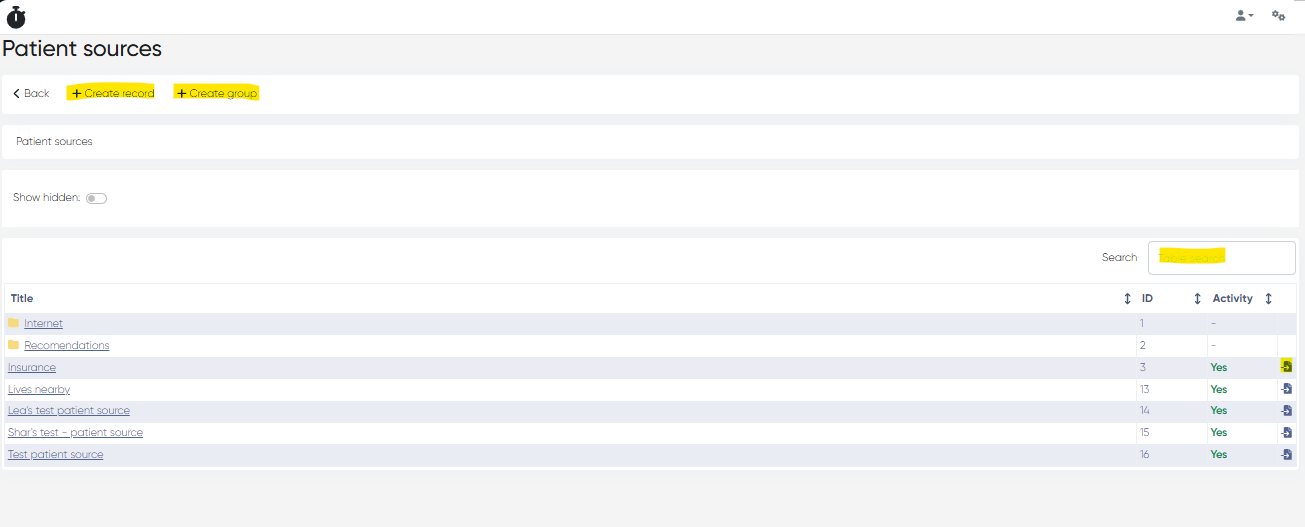
Actions and Features:
Action | Description |
|---|---|
+ Create Record | Add a new patient source (e.g., “Google Ads”, “Instagram”, “Walk-in”) |
Title Field | Set the visible name for the patient source |
Save | Confirm creation |
+ Create Group | Create a folder (group) to organize patient sources |
Search Bar | Quickly locate a source by title |
Move to Group | Assign an existing source to a group folder |
Use folders to structure sources by type (e.g., Digital, Offline, Referrals) or campaigns.
2. Patients Report by Source
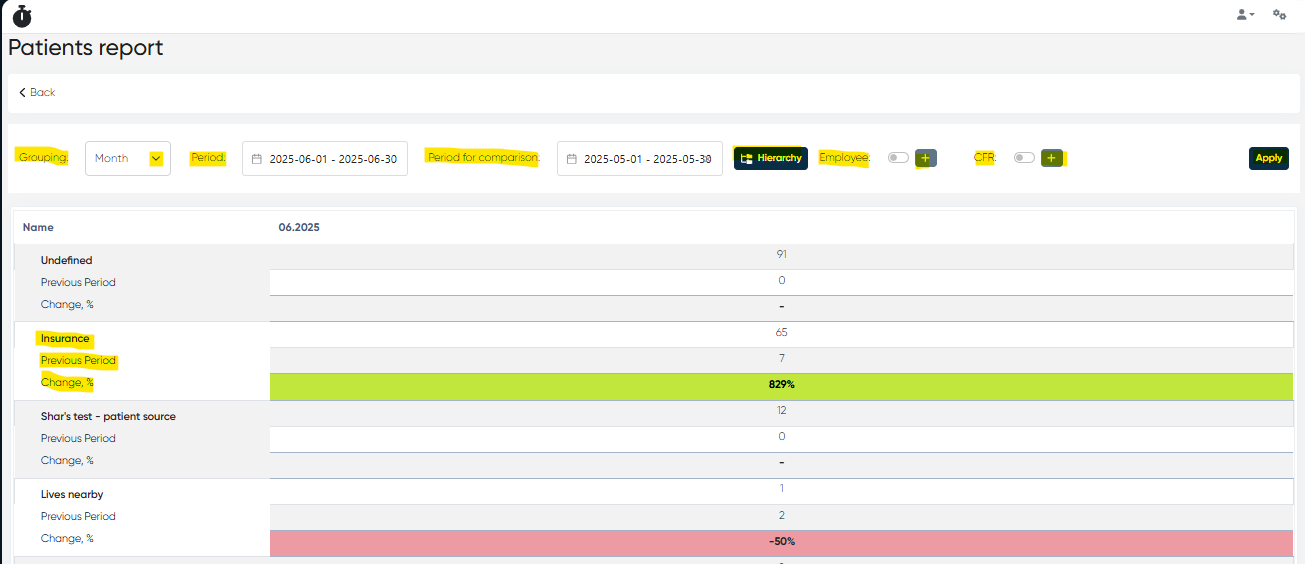
This report allows you to analyze patient volumes and trends based on their original source, helping you measure the impact of your marketing channels over time.
Navigation:
Analytics > Patients Report
Filters, Toggles & Controls:
Control | Function |
|---|---|
Grouping | Choose grouping by Day, Month, or All Period |
Period Selector | Select reporting period using calendar |
Period for Comparison | Set a past period (must match length of current period) for comparison |
Hierarchy Button | Configure report display, including: |
| |
| |
| |
| |
Employee Toggle + Add | Filter report by specific staff members |
CFR Toggle + Add | Filter by specific cost/profit responsibility centers |
Report Output:
The report table displays:
Row | Description |
|---|---|
Patient Source | Source of patient (e.g., Facebook Ads, Referring Doctor) |
Current Period | Number of patients acquired in the selected time frame |
Previous Period | Same-source count from past comparison period |
Change % | Comparison percentage (green = increase, red = decrease) |
This lets you evaluate the growth, decline, or stability of each source and make informed decisions on where to allocate marketing or outreach efforts.
Summary
Feature | Description |
|---|---|
Source Creation | Define and categorize how patients reach your clinic |
Group Management | Organize sources into folders for easier tracking and reporting |
Patient Report | Analyze acquisition trends across all patient sources |
Visual Growth Indicators | Quickly identify effective and underperforming channels |
Customizable Hierarchy | Configure the report view to match business needs |