
Multidisciplinary Tumor Board (MTB)
Multidisciplinary Tumor Board (MTB) Module
Navigation:
Main Menu → MTBs(Tumor Board Meetings Overview)Main Menu → MTB Cases(Individual Case Management)
Overview
The Multidisciplinary Tumor Board (MTB) module is a major enhancement for clinics managing oncology workflows and collaborative diagnostic processes.
It enables teams of specialists to conduct structured, multidisciplinary case discussions, assign responsibilities, document outcomes, and monitor progress across clearly defined stages.
This module introduces two new sections in the main system menu:
MTBs — Tumor Board Meetings Overview
MTB Cases — Individual Case Management
Together, these tools provide a full workflow for organizing, conducting, and documenting tumor board activities across specialties.
1. MTBs – Tumor Board Meetings Overview
Navigation:Main Menu → MTBs
The MTBs section serves as the central hub for creating, scheduling, and managing multidisciplinary board meetings. It allows administrators and clinicians to define board details, invite participants, and track the meeting’s progress through structured workflow stages.
Creating a New MTB
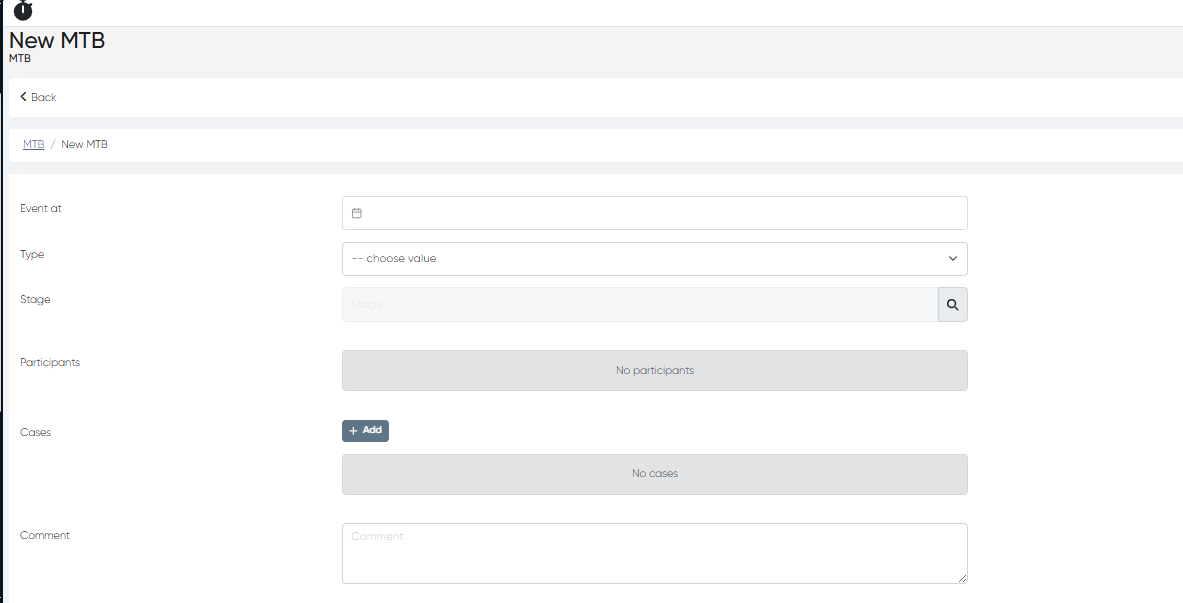
Click + Create Record.
In the MTB creation form, complete the following fields:
Field | Description |
|---|---|
Event at | Date and time when the tumor board meeting is scheduled. |
Type | Select the board type based on the specialty focus — e.g., General, Urologist, Cardiologist, Oncologist, etc. |
Stage | Define the current workflow stage of the board. Available options include: |
Participants | Click + Select a Doctor to add individual specialists or employees from the system’s directory. |
Cases | Click + Add to link existing MTB cases (each representing a patient under discussion). |
Comment | Add general notes, meeting objectives, preparation details, or outcome remarks. Long-form entries are supported. |
List View and Data Columns
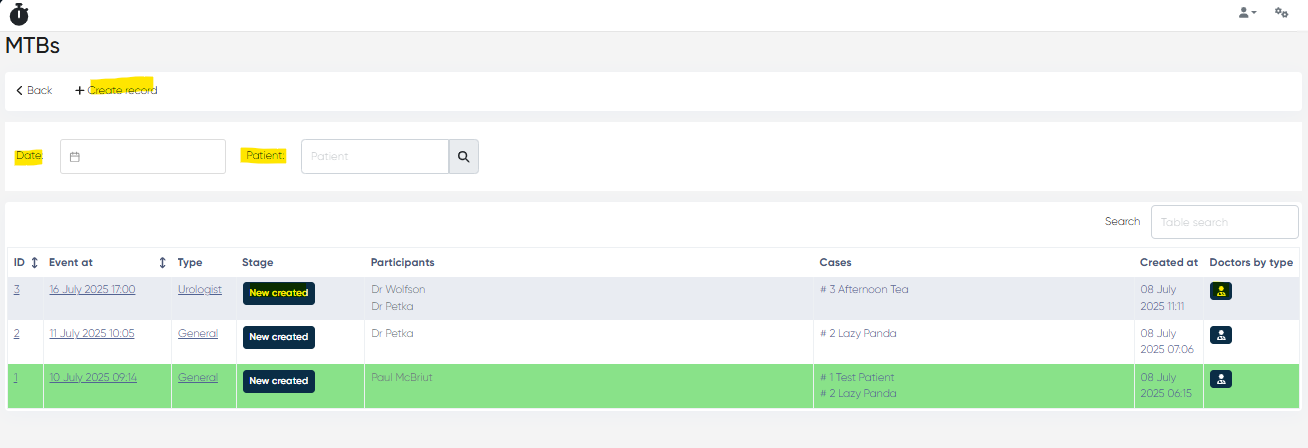
Column | Description |
|---|---|
ID | Internal MTB record ID |
Event at | Scheduled date and time of the session |
Type | Specialty or board type |
Stage | Current status (editable via dropdown) |
Participants | List of assigned doctors or specialists |
Cases | Count of linked patient cases |
Created at | Date when the board was registered |
Additional view options:
Doctors by Type Scheme View — displays a visual grouping of participants by specialty or assigned role.
Filters and Search Tools
Date Filter – Filter boards by scheduled meeting date or range.
Patient Filter – Show only boards linked to a specific patient.
Search Bar – Search by MTB type, participant, or text in comments.
2. MTB Cases – Individual Case Management
Navigation:Main Menu → MTB Cases
The MTB Cases section allows users to create and manage patient-specific cases intended for discussion during tumor board meetings. Each case stores the patient’s identifying information, referral details, and links to its associated board sessions.
Creating a New MTB Case
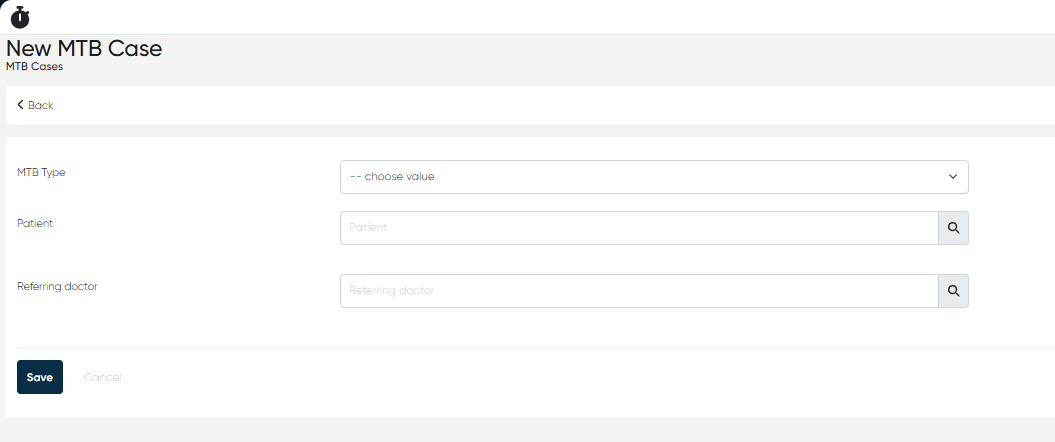
Click + Create Record to open the MTB Case form.
Fill out the following fields:
Field | Description |
|---|---|
MTB Type | Select the appropriate board type (e.g., General, Oncology, etc.) to which the case belongs. |
Patient | Search and select the patient from the database. Patient demographics and history are automatically linked. |
Referring Doctor | Choose the doctor who referred the case for multidisciplinary discussion. Typically, the treating physician or department head. |
Case List View
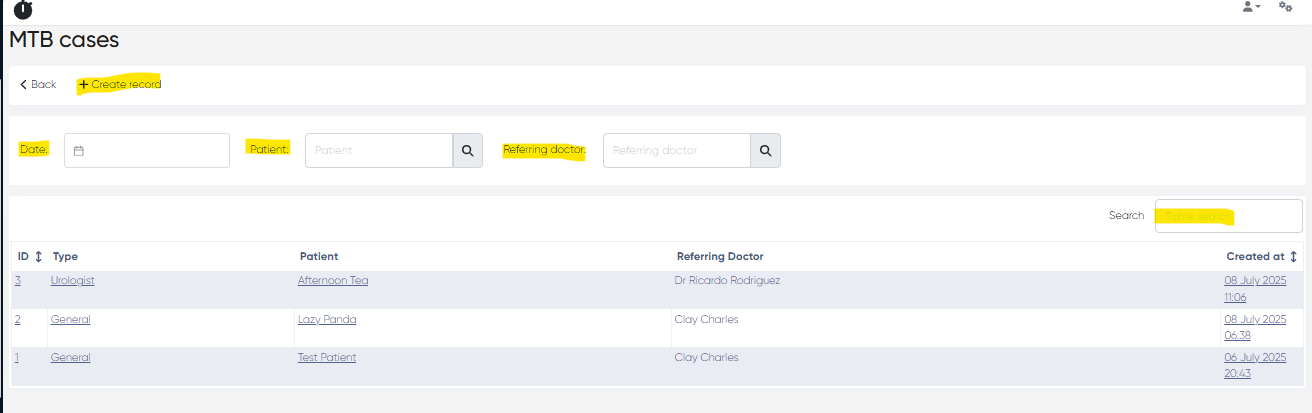
Column | Description |
|---|---|
ID | Internal record number |
Type | MTB type assigned to the case |
Patient | Patient name and ID |
Referring Doctor | The doctor who referred the case |
Created at | Date the case was added to the system |
Filters and Search Tools
Date Filter – Filter by case creation date.
Patient Filter – Search for cases by patient name.
Referring Doctor Filter – View cases submitted by a specific doctor.
Search Bar – Search by case details, comments, or board type.
Summary of Benefits
Centralized MTB management — one place to create meetings and link cases.
Cross-specialty collaboration — unified platform for multiple disciplines.
Structured stages — clear progression tracking for each tumor board.
Enhanced accountability — participant assignments and outcomes are traceable..