
MessageWhiz SMS Provider Integration
Navigation:Settings → Messaging Settings → SMS Gateway Tab
Overview
The MessageWhiz Integration enables clinics to send SMS messages directly through the MessageWhiz platform from within the system.
This integration provides a reliable, secure, and scalable way to deliver appointment confirmations, reminders, and general notifications to patients via SMS.
By connecting MessageWhiz as your SMS provider, all system-generated messages — including automated templates — will be routed through the configured gateway.
How to Configure
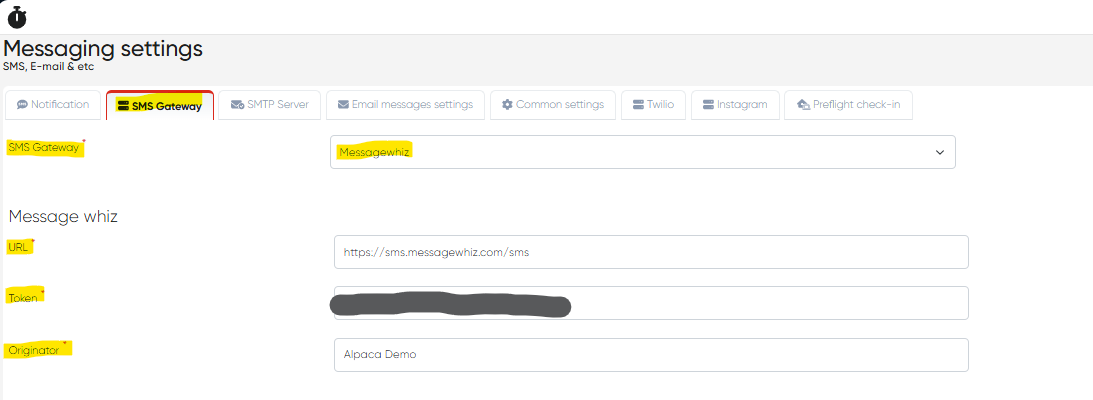
Navigate to Settings → Messaging Settings → SMS Gateway Tab.
From the SMS Gateway dropdown, select MessageWhiz.
Fill in the following mandatory configuration fields:
Field | Description |
|---|---|
URL | The base API endpoint for MessageWhiz communication. |
Token | Your unique authentication token used to authorize API requests. |
Originator | The sender name (alphanumeric ID or number) displayed to message recipients. |
Click Save to apply the configuration.
Send a test SMS to verify that your connection and credentials are working properly.
Where to Find Credentials in MessageWhiz
Log in to your MessageWhiz Dashboard.
Go to Settings → API Settings.
Copy or generate the required credentials:
API URL: Copy the Base API Endpoint.
Token: Generate or retrieve it from API Access / Authentication.
Originator: Found under Sender IDs / From Name.
Return to the system’s SMS Gateway tab and enter these values.
Benefits
Reliable delivery through an enterprise-grade SMS gateway.
Supports automated and manual messaging from multiple modules (Reception, CRM, Cashier).
Enhances communication efficiency with direct MessageWhiz API integration.
Simplified setup with straightforward credential mapping.
Notes
All three fields (URL, Token, Originator) are mandatory for successful integration.
Ensure your MessageWhiz account has active sender IDs and sufficient balance for message delivery.
The integration supports both one-time notifications and automated templates.
Test messages should be sent to a valid mobile number before enabling live patient communication.